BlogPyFluentPythonAnsys FluentCFDAutomationPyAnsysSettings APITUI API
Bridging Python and Fluent: A Guide to PyFluent APIs
PyFluent API interfaces, in simple terms, helps you understand how to choose the right one for Fluent automation and where to find the official references.
GV
Gopi Raju Velpula
Jun 19, 20265 min read
In our previous blogs, we explored what PyFluent is, how it works, and the different packages it provides. In this blog, we take the next step and explore the APIs available in PyFluent.
Understanding these APIs is important because they form the foundation of Fluent automation. Once you know the available API options, you can choose the approach best suited to your workflow and development needs.
If the term “API” sounds complicated, don’t worry. In this blog, we’ll break it down with simple examples and practical explanations. By the end, you’ll understand the two primary API interfaces provided by PyFluent and know how to find API references in the official PyFluent documentation.
What Is an API?
An API (Application Programming Interface) is a set of rules that allows one software application to communicate with another. In the case of PyFluent, APIs let Python programs interact with Ansys Fluent without requiring manual operations in the Fluent GUI.
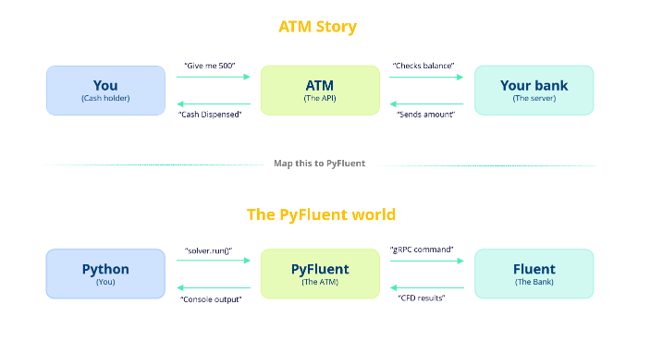
Let’s understand this with a simple story. Think about what happens when you go to an ATM to withdraw money:
You insert your card and press “Withdraw.” In PyFluent, you write a Python command like solver.run_calculation.iterate()
The ATM talks to your bank on your behalf, so you never call the bank directly. PyFluent translates your Python into the gRPC calls that Fluent understands.
The bank checks your account and processes the request. Fluent runs the actual CFD computation: meshing, iterating, converging.
Cash comes out in your language, at your machine. Results come back as Python objects: pressure, velocity, and temperature data.
Key Takeaways
An API is a bridge, similar to the ATM, between you and the bank.
PyFluent is the Python API for Ansys Fluent: the bridge between your Python code and the CFD solver.
You write Python. PyFluent translates it into Fluent’s internal language (gRPC). Fluent solves. Results come back as Python objects.
For most automation tasks, PyFluent eliminates the need to interact with the GUI manually. When required, the TUI API gives you access to Fluent’s command-based interface.
PyFluent provides two primary interfaces for interacting with a Fluent session: the Settings API and the TUI API. Both ultimately control the same Fluent solver, but they differ significantly in usability, style, and development experience.
Settings API
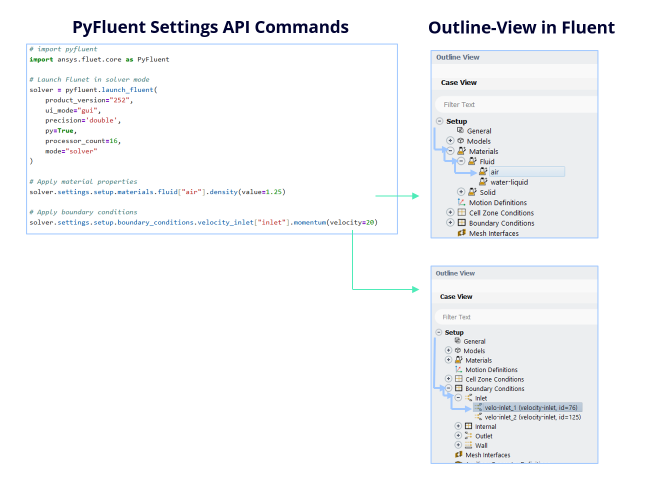
The Settings API is designed with modern Python development in mind. Instead of relying on string commands, it gives you a clean, object-oriented interface for controlling the solver, closely mirroring the object tree you see in the Ansys Fluent application itself.
Advantages of the Settings API
Hierarchical access. Drill down into solver configuration naturally, e.g.solver.settings.setup.models.energy.enabled = True.
Strong typing & validation. Get immediate feedback if something is incorrect.
IDE support. Autocomplete and inline help make exploration much easier.
Modern Python features. Integrates well with enums, context managers, and structured workflows.
The Settings API feels like writing Python code that understands the solver, rather than sending instructions blindly.
TUI API
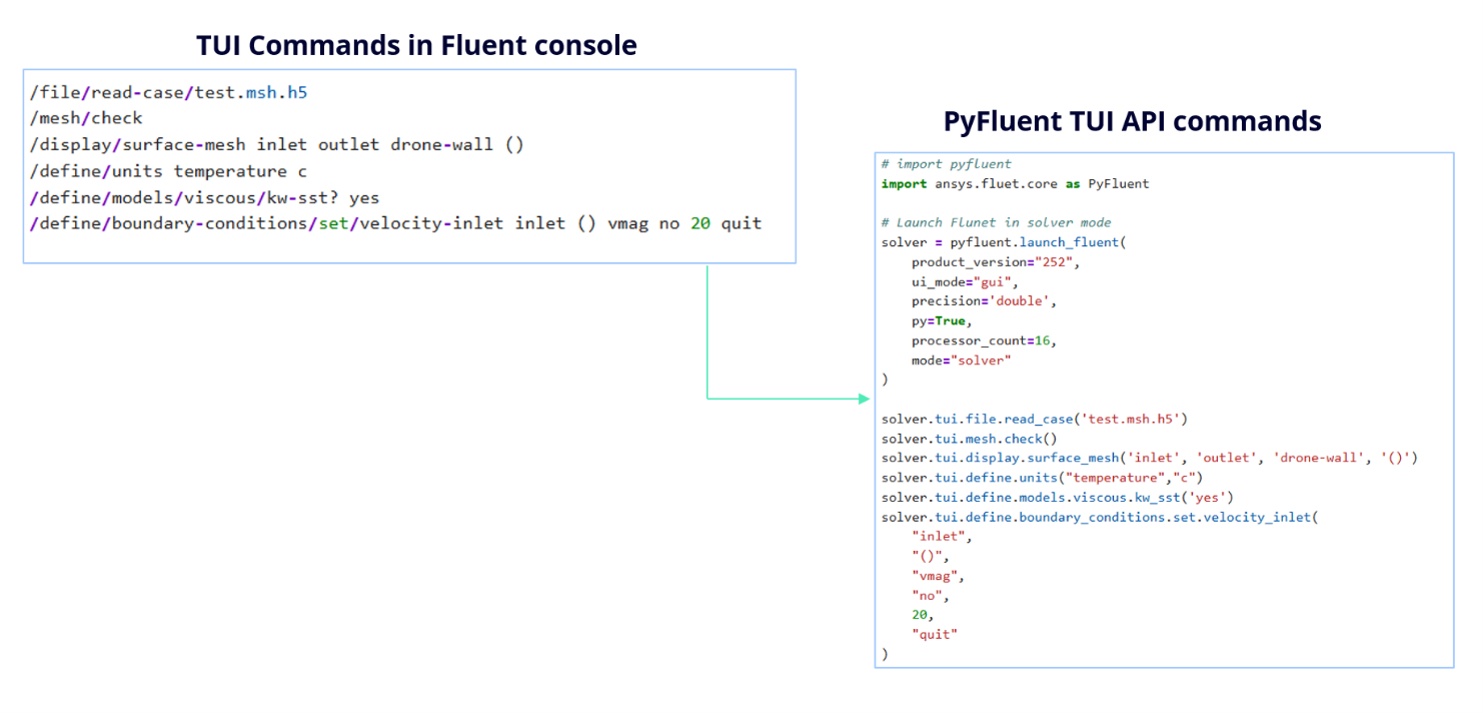
TUI stands for Text User Interface. The TUI API exposes Fluent’s command-driven interface through Python, letting you run the same commands you would normally type into the Fluent console. Every Ansys Fluent text-interface command is available through the TUI API.
Advantages of the TUI API
Direct control. Behaves exactly like Fluent’s internal console.
Full coverage. Includes some advanced or niche commands that may not yet be available in the Settings API.
Compatibility with older workflows. Many existing scripts and automation pipelines still rely on TUI.
The trade-off is that this approach requires memorizing command structures and passing arguments as strings, which can be error-prone.
Conclusion
At the end of the day, both the Settings API and the TUI API are just different ways of controlling the same Fluent solver, but the experience each provides is quite different.
The Settings API brings a modern, Python-friendly approach where everything feels structured, readable, and intuitive. It aligns naturally with how developers think and write code today: instead of remembering commands, you explore and interact with the solver as if it were a well-organized Python object.
The TUI API still plays an important role. It gives you complete access to Fluent’s internal capabilities and is especially useful for legacy workflows or features not yet exposed in the Settings API.
In real-world usage, it isn’t about choosing one over the other. A practical approach is to:
Use the Settings API as your primary interface for writing clean, maintainable automation scripts.
Fall back to the TUI API when you need flexibility or full command coverage.
From a developer’s perspective, the Settings API is clearly the future. It improves productivity, reduces errors, and makes automation more enjoyable. Understanding the TUI API, however, ensures you’re never limited in what you can achieve.