Vehicle structures are constantly subjected to repeated loading from road conditions, braking, acceleration, and vibration. Among all structural components, the vehicle subframe plays a crucial role in supporting suspension systems and transferring loads throughout the chassis. Because of these repeated load cycles, fatigue failure becomes a major design concern, particularly in welded joints.
Welds are often the weakest points in a structure when it comes to fatigue performance. During welding, residual tensile stresses are introduced, which can accelerate crack initiation. In addition, weld material typically exhibits lower fatigue resistance than the base metal, and the geometric features of welds create stress concentrations that make them ideal locations for fatigue cracks to start.
To address these challenges, engineers rely on Ansys Design Life — a tool that enables accurate fatigue life prediction and early identification of critical weld locations during the design stage.
Section 01Exploring Weld Fatigue Approaches in Ansys Design Life
Ansys Design Life provides multiple approaches depending on the type of weld and the modelling strategy used in the finite element model:
- Shell Seam Weld — For shell elements (thin plate welds, sheets ~1–3 mm). Fatigue damage is evaluated at the weld toe and weld root considering membrane and bending stresses. No highly refined mesh or detailed weld geometry is required.
- Solid Seam Weld — For solid elements (thicker plates). Uses stress linearization to recover structural stresses within the weld region. Evaluates fatigue at the weld toe, root, and throat.
- Spot Weld — For automotive assemblies with spot welds. Evaluates durability based on cross-sectional forces and moments at multiple angular increments around the weld edge. Python scripting extends the methodology to rivets and bolts.
- Stress Life (S–N) — For high-cycle fatigue where stresses remain largely elastic.
- Strain Life (E–N) — For low-cycle fatigue where plastic deformation occurs.
Section 02Workflow for Weld Fatigue Evaluation
Step 1: Preparing the Weld Model
The workflow begins with geometry preparation in Ansys SpaceClaim or Ansys Discovery. Surfaces of sheet metal components are extracted and weld lines are defined as curves representing the location of the welded joints. These weld curves are then modelled as beam elements, allowing the weld geometry to be represented without explicitly modelling the weld bead.
Step 2: Structural Simulation in Ansys Mechanical
The prepared model is imported into Ansys Mechanical, where the welds are generated using the Weld Mesh feature. A structural analysis determines the stress and strain distribution within the subframe under loading conditions. This step is critical because the fatigue simulation relies on these stress results as input data.
Step 3: Exporting Results to Design Life
Once the structural analysis is completed, the solution is connected directly to an embedded Design Life system within the Ansys Workbench environment. This integration allows stress results to be automatically transferred to the fatigue module without additional preprocessing.
Step 4: Selecting the Weld Fatigue Type
Within the fatigue analysis setup, the Shell Seam Weld method is selected to match the shell element model of the subframe.
Step 5: Generating the Load Event
The next step is to define the loading history using the Load Mapper tool in Design Life. In this example, a time-step loading event is used — structural analysis results are applied at three discrete time points (1, 2, and 3), and the loading cycle is repeated 2000 times to simulate repeated operational conditions.
Ansys Design Life supports several load types for defining loading histories:
- Constant Amplitude — A simple cyclic load with fixed amplitude and frequency. Suitable for quick fatigue checks and baseline studies.
- Time Step — Load data defined at discrete time steps. Useful when simulation results are exported as time histories.
- Time Series — Continuous load history over time, capturing variations in amplitude and frequency. Used for real-world measured data.
- Temperature Load — Accounts for thermal effects on fatigue life. Applied when fatigue behaviour is strongly influenced by thermal cycling.
2000
loading cycles simulated
3
discrete time-step load points
Shell
seam weld method for thin-plate
Step 6: Run Fatigue Simulation & Interpret Results
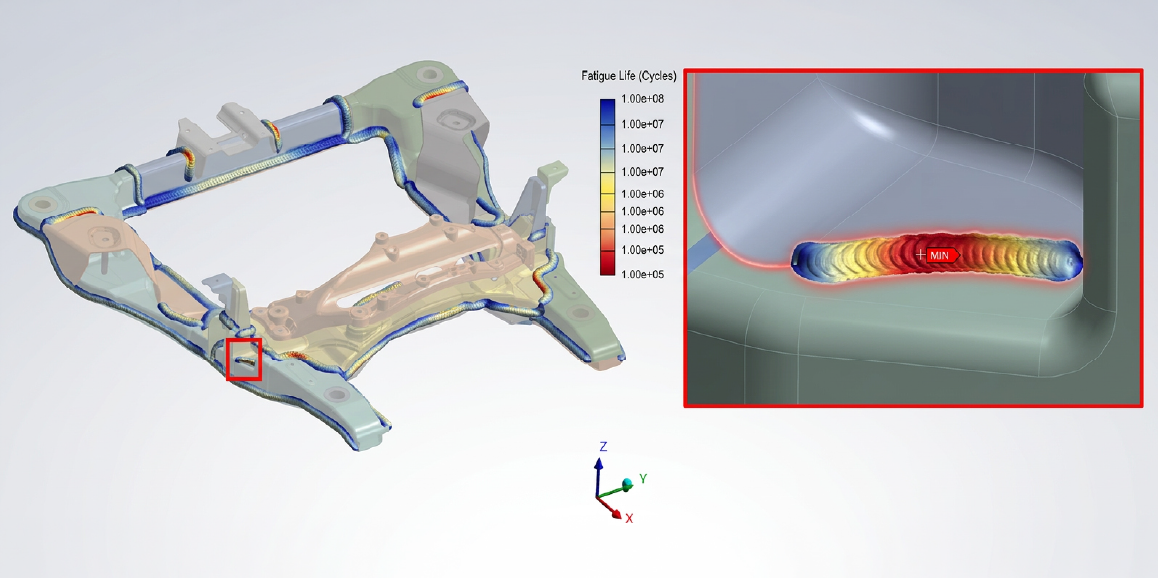
After defining the loading events, the fatigue simulation is launched in Ansys Design Life. The software processes the stress histories and applies fatigue damage models to evaluate crack initiation and fatigue life at each weld location. Results are displayed using contour plots that highlight regions of high fatigue damage and identify the most critical weld locations within the subframe.
Conclusion
Fatigue failure in welded structures is a critical concern in the automotive industry, particularly for components such as vehicle subframes that experience repeated dynamic loading throughout their service life. By combining the geometry preparation capabilities of Ansys Space Claim / Ansys Discovery, the structural analysis capabilities of Ansys Mechanical, and the advanced fatigue evaluation tools available in Ansys Design Life, engineers can perform comprehensive weld durability assessments. This integrated workflow not only helps identify potential fatigue failures early in the design process but also enables engineers to optimize weld locations, improve structural reliability, and reduce the risk of costly failures in the field. Ultimately, adopting such advanced simulation-driven design approaches allows manufacturers to build stronger, safer, and more durable vehicles while accelerating product development cycles.
As an authorized Ansys channel partner, CADFEM supports customers throughout their simulation journey by providing expert technical guidance, customized workflows, advanced training, and hands-on implementation support. From model setup and parameter calibration to validation and optimization, CADFEM helps organizations fully leverage Ansys wear simulation capabilities to achieve reliable, high-quality engineering solutions. Together, Ansys Mechanical and CADFEM enable engineers to make informed design decisions, improve product durability, and accelerate innovation through simulation-driven development.
Found this useful? Share it